Visualizing Bitburner: A Custom GUI for Real-Time Game Data
Introduction
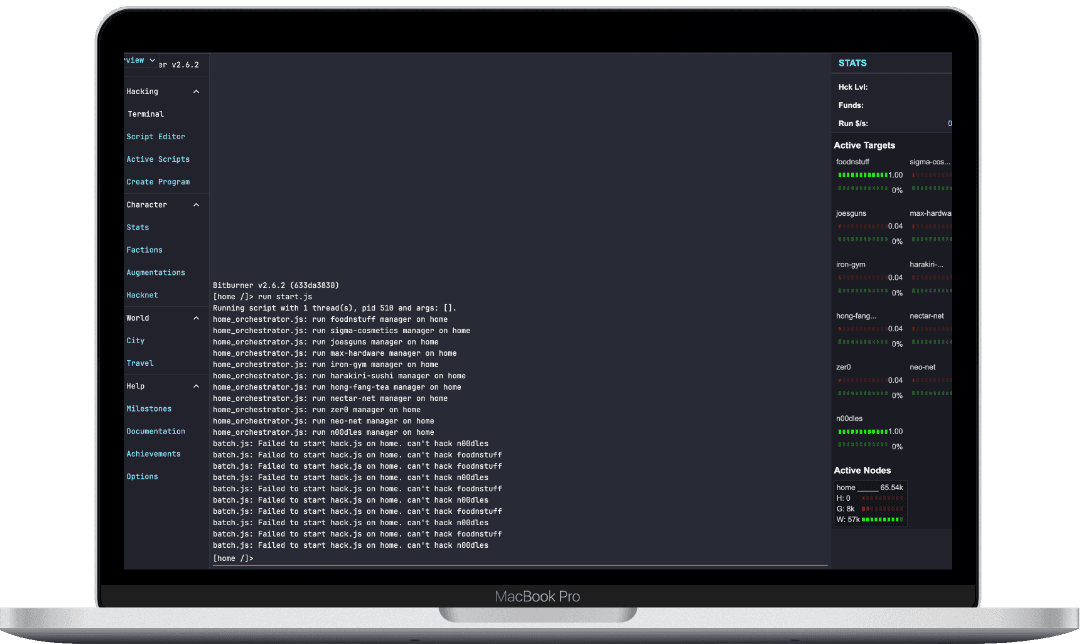
Bitburner is a complex game that combines hacking, scripting, and automation. To enhance my gameplay, I created a custom user interface (UI) that visualizes real-time game data. This UI helps track hacking progress, resources, and target nodes, making the gameplay smoother and more strategic.
In addition to this, I experimented with building a custom React component renderer and a diffing algorithm tailored for Bitburner. The unique challenge was that Bitburner doesn’t easily allow long-living scripts, so using traditional React libraries like react-dom wasn't feasible.
Project Overview
The UI functions as an interactive game HUD, tapping into Bitburner's API to display live stats, targets, and node performance in a responsive layout. The core features include:
- Live Hacking Stats: Displays player hacking level, available funds, and real-time money acquisition rate.
- Target Monitor: Shows attack targets, security levels, and money available.
- Node Overview: Tracks active nodes, hack/grow/weaken operations, with visual progress bars.
Additionally, I built a custom React rendering engine from scratch to work within Bitburner's limitations. This allows for dynamic UI updates using familiar React-style components, without relying on traditional libraries like react-dom. I also implemented a diffing and patching algorithm to efficiently update the DOM without restarting the script, which is crucial in Bitburner's environment where scripts are usually short-lived.
Key Components
1. User Stats
The User component displays the player's hacking stats, including their hacking level, available funds, and money-per-second rate.
const User = ({ ns }) => {
  const hackLvl = ns.getHackingLevel();
  const money = ns.getServerMoneyAvailable('home');

  return React.createElement(
    CollapsibleSection,
    { id: 'user-section' },
    Row({ children: ["Hck Lvl:", hackLvl] }),
    Row({ children: ["Funds:", formatNumber(money)] }),
    Row({ children: ["Run $/s:", formatNumber(calculateMoneyPerSecond())] })
  );
};
2. Target Tracker
The Target component monitors attack targets, displaying server money available and security level with visual progress bars.
const Target = ({ ns, target }) => {
  const money = ns.getServerMoneyAvailable(target.name);
  const security = ns.getServerSecurityLevel(target.name);

  return React.createElement(
    'div',
    { style: {} },
    Row({ children: [target.name, "Money:", formatNumber(money)] }),
    Row({ children: ["Security:", formatNumber(security)] })
  );
};
3. Node Performance
The Node component tracks hacking operations on each active node, using ProgressBar components to visualize hack/grow/weaken progress.
const Node = ({ ns, node, stats }) => {
  const maxRam = ns.getServerMaxRam(node);

  return React.createElement(
    'div',
    { style: {} },
    Row({ children: [node, "Max RAM:", formatNumber(maxRam)] }),
    ProgressBar({ percent: stats.hack / maxRam, label: "Hack" }),
    ProgressBar({ percent: stats.grow / maxRam, label: "Grow" }),
    ProgressBar({ percent: stats.weaken / maxRam, label: "Weaken" })
  );
};
Experimenting with a Custom React Renderer
One of the main challenges I faced was working around Bitburner’s limitations, where long-living scripts are discouraged. This meant I couldn’t rely on React’s react-dom for efficient DOM updates. Instead, I decided to build a custom renderer that mimics React's component system while integrating directly with the game’s DOM.
The custom renderer takes in React components, processes them recursively, and creates HTML elements that are manually appended to the DOM. Here's an example of how the rendering works:
export function renderToHTMLElement(element) {
  if (typeof element === 'string' || typeof element === 'number') {
    return document.createTextNode(element);
  }

  if (typeof element.type === 'function') {
    const renderedElement = element.type(element.props);
    return renderToHTMLElement(renderedElement);
  }

  const domNode = document.createElement(element.type);
  Object.entries(element.props || {}).forEach(([key, value]) => {
    if (key === 'children') return;
    if (/^on[A-Z]/.test(key)) {
      domNode.addEventListener(key.toLowerCase().substring(2), value);
    } else if (key === 'style') {
      Object.assign(domNode.style, value);
    } else {
      domNode.setAttribute(key, value);
    }
  });

  const children = Array.isArray(element.props?.children)
    ? element.props.children
    : [element.props?.children || ''];

  children.forEach(child => domNode.appendChild(renderToHTMLElement(child)));

  return domNode;
}
Diffing Algorithm for Efficient Updates
To optimize performance, I implemented a diffing algorithm that compares the old and new virtual DOM trees and selectively applies changes to the real DOM. This keeps the UI responsive while minimizing unnecessary updates.
function diffAndUpdate(oldNode, newNode) {
  if (!newNode) {
    oldNode.remove();
    return;
  }

  if (oldNode.nodeType !== newNode.nodeType || oldNode.nodeName !== newNode.nodeName) {
    oldNode.replaceWith(newNode);
    return;
  }

  if (oldNode.nodeType === Node.TEXT_NODE && oldNode.textContent !== newNode.textContent) {
    oldNode.textContent = newNode.textContent;
    return;
  }

  const oldAttrs = Array.from(oldNode.attributes);
  const newAttrs = Array.from(newNode.attributes);

  oldAttrs.forEach(attr => {
    if (!newNode hasAttribute(attr.name)) {
      oldNode.removeAttribute(attr.name);
    }
  });

  newAttrs.forEach(attr => {
    if (oldNode.getAttribute(attr.name) !== attr.value) {
      oldNode.setAttribute(attr.name, attr.value);
    }
  });

  const oldChildren = Array.from(oldNode.childNodes);
  const newChildren = Array.from(newNode.childNodes);
  const maxLength = Math.max(oldChildren.length, newChildren.length);

  for (let i = 0;i < maxLength;i++) {
    diffAndUpdate(oldChildren[i], newChildren[i]);
  }
}
UI Design and Style
The UI features a minimalist, dark theme to match Bitburner’s aesthetic, with vibrant progress indicators. Styling is centralized in a theme.js file:
const theme = {
  color: {
    blue: '#4a90e2',
    yellow: '#f4d03f',
    green: '#27ae60',
    red: '#e74c3c',
    white: '#ecf0f1',
  },
  size: {
    font: {
      md: '14px',
    },
  },
  spacing: {
    sm: '8px',
    md: '16px',
    lg: '24px',
  },
};
Final Thoughts
This custom UI, along with the custom React renderer and diffing system, has significantly improved my gameplay by providing real-time data tracking and resource management. Building a custom rendering engine was an exciting challenge that opened up possibilities for more tailored UIs in Bitburner.
I'm continuing to refine the interface with more features like notifications and enhanced visuals. This project showcases how a well-designed UI and custom rendering logic can elevate both gameplay and strategy in Bitburner.